
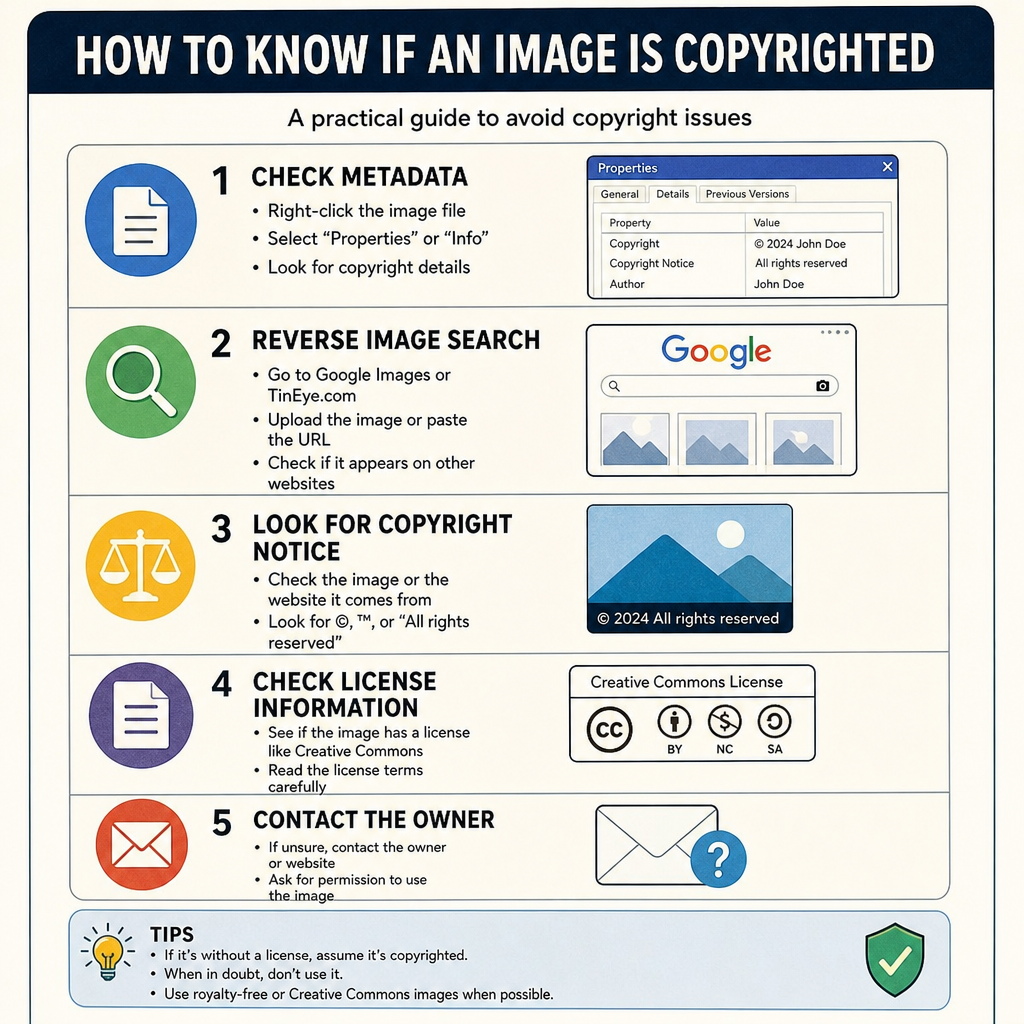
How to Know if an Image Is Copyrighted: A Guide
Have you ever found the perfect image for your blog, social media post, or business presentation, only to pause and wonder: how to know if picture is copyrighted? In our highly visual digital landscape, it is incredibly easy to right-click and save a beautiful photograph. However, using images without proper authorization can lead to severe legal and financial repercussions.
Whether you are a blogger, a small business owner, or a digital marketer, understanding image ownership is a non-negotiable skill. This comprehensive guide will walk you through exactly how to identify if an image is protected by copyright, how to navigate different licensing types, and how to source visual content legally and safely. If you have ever asked how to know if an image is copyrighted or how to see if an image is copyrighted, the steps below will help you proceed with confidence.
The Golden Rule: Assume Every Image is Copyrighted
The most straightforward answer to how to know if an image is copyrighted is simply to assume that it is. Under modern copyright law in most countries, a creative work is automatically copyrighted the moment it is created and fixed in a tangible form. A photographer does not need to register their photo with a government office or attach a © symbol for it to be protected.
Ignorance of the law is not a valid defense. The consequences of accidental copyright infringement can range from a polite email asking you to remove the image, to hefty financial penalties and costly lawsuits. Therefore, unless you can definitively prove otherwise, treat every image you find online as someone else’s protected property.

Practical Steps to Verify Image Ownership
If you have a specific image you want to use, you need to play digital detective. Here are the most effective methods for tracking down ownership details.
1. Look for Visual Clues and Watermarks
When figuring out how to see if an image is copyrighted, start with the visual evidence. Many professional photographers and stock photo agencies protect their work visually.
Identifying digital watermarks on online images is your first line of defense. Look for:
- Faint logos or text stretching across the center of the image.
- Small copyright symbols (©) in the bottom corners.
- The photographer’s name or website URL subtly blended into the background.
Even if an image does not have a watermark, it does not mean it is free to use. Watermarks are just the most obvious indicator of ownership.
2. Inspect the Image Metadata
If you want to understand how to find out if an image is copyrighted beyond surface-level visual clues, checking the embedded data is your next best step. Digital photos carry hidden information called metadata.
This process, known as verifying image metadata for creator information, can often reveal the photographer’s name, copyright status, and even the camera settings used. By checking EXIF data for image ownership, you can look for fields specifically labeled “Copyright” or “Author.”
How to check metadata:
- On Windows: Right-click the downloaded image file, select “Properties,” and navigate to the “Details” tab. Look for the “Copyright” section.
- On Mac: Open the image in Preview, click “Tools” in the top menu, select “Show Inspector,” and click the “EXIF” or “IPTC” tab to view ownership details.
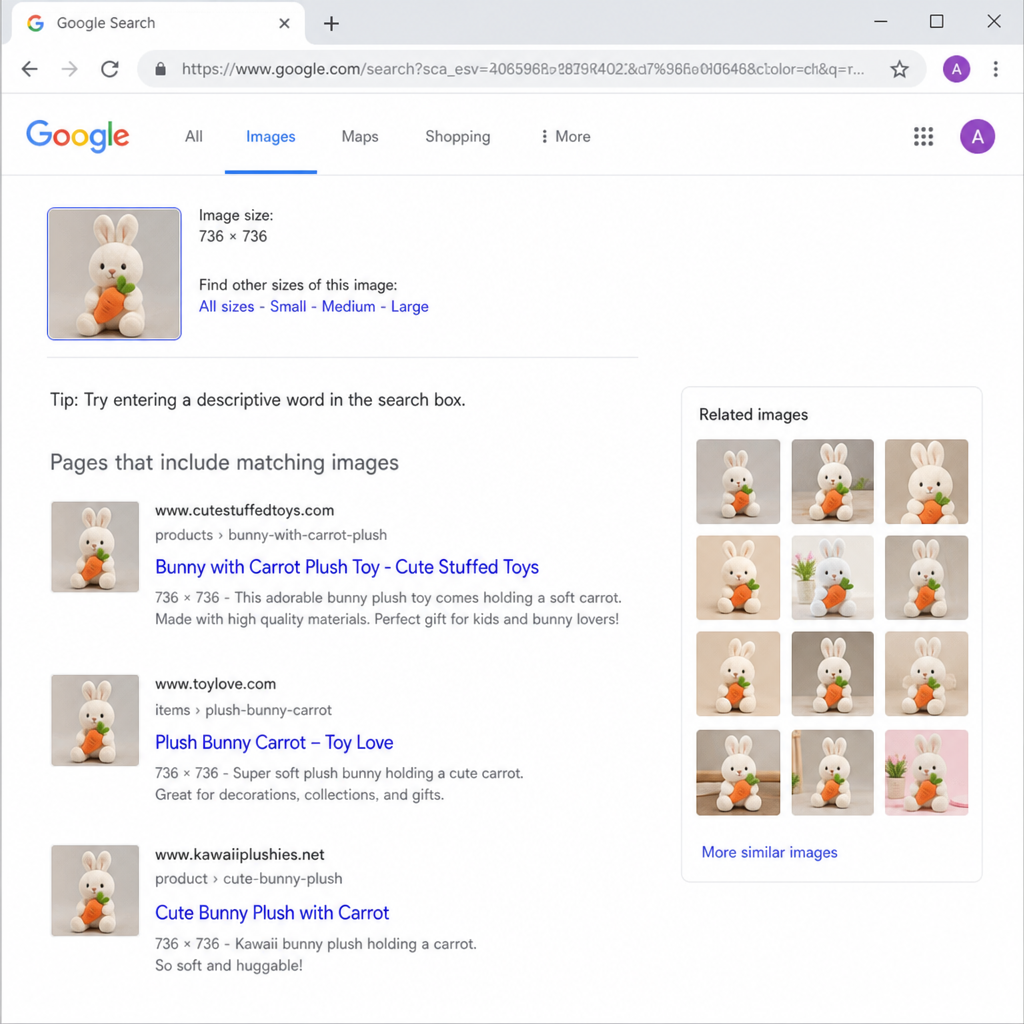
3. Utilize Reverse Image Search
Another common question is how to know if a photo is copyrighted when it has been shared thousands of times on Pinterest or Tumblr without credit. Knowing how to find the original source of a photo is essential in these scenarios.
When considering how to check if a picture is copyrighted, reverse searching is incredibly powerful. Tools like Google Lens, TinEye, or Bing Visual Search allow you to upload an image and see everywhere it appears on the web.
Using a reverse image search for license verification helps you trace the picture back to its original creator. This is especially useful for locating the photographer of a viral image. If the search results lead you to a premium stock photo site (like Getty Images or Shutterstock) or a professional photographer’s portfolio, the image is undoubtedly copyrighted, and you must purchase a license or seek permission to use it.
4. Filter Search Engine Results
So, how can you tell if an image is copyrighted just by looking at a search results page? If you are searching for images on Google, you can filter your results to only show images that creators have explicitly marked as available for reuse.
Here is a quick Google Images usage rights filter tutorial:
- Go to Google Images and type in your search term.
- Click on “Tools” just below the search bar.
- Click on “Usage Rights.”
- Select “Creative Commons licenses” to find images you can potentially use for free (always check the specific terms).
Decoding Image Licenses
To truly master visual content sourcing, you must understand the different types of licenses creators apply to their work.
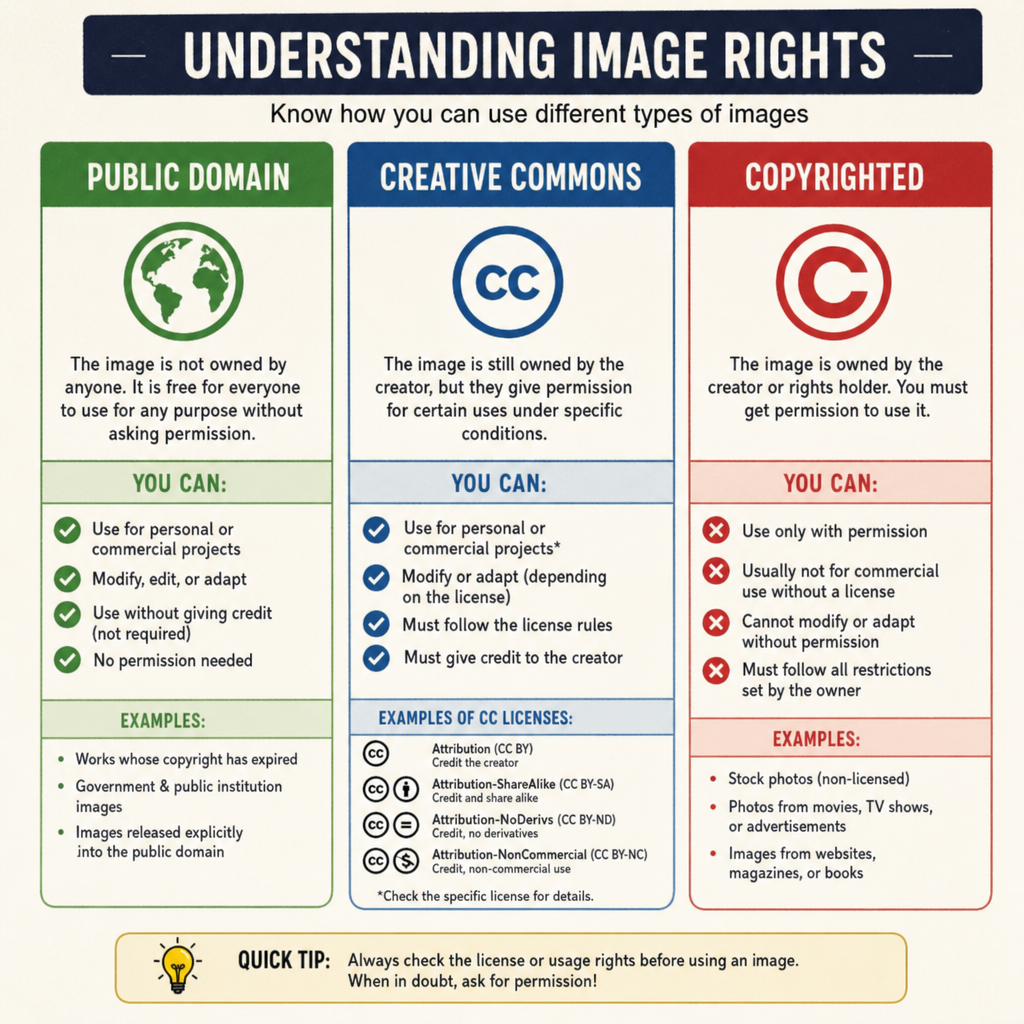
Creative Commons vs Public Domain
Understanding Creative Commons vs Public Domain licenses is crucial for finding safe, free images.
- Public Domain: Images in the public domain have no copyright restrictions. This happens because the copyright has expired, the creator deliberately waived their rights, or the work is not eligible for copyright (like certain government photos). You can use these images freely for any purpose.
- Creative Commons (CC): CC licenses allow creators to grant permission for others to use their work under specific conditions. For example, some CC licenses require you to credit the creator (Attribution), while others forbid you from modifying the image (NoDerivatives) or using it for business purposes (NonCommercial). Always read the specific CC license attached to the photo.
Stock Photography Licenses
If you are purchasing images, knowing the difference between royalty-free vs rights-managed stock photography will save you money and legal headaches.
- Royalty-Free (RF): You pay a one-time flat fee to use the image multiple times for various purposes without paying ongoing royalties. However, you do not own the image, and others can buy and use the same image.
- Rights-Managed (RM): You pay a fee based on exactly how, where, and for how long you plan to use the image. This is often more expensive but allows for exclusive use, preventing your competitors from using the same photo.
The Social Media Dilemma
People often ask: are social media photos free for commercial use? The answer is an absolute no.
Just because an image is publicly visible on Instagram, Facebook, or X (formerly Twitter) does not mean it is in the public domain. The person who took the photo still owns the copyright. If you want to use a user-generated photo in a commercial campaign or on your business blog, you must get explicit permission from the creator. Embedding a social media post using the platform’s native embed tool is generally acceptable, but downloading the image and uploading it to your own server without permission is a copyright violation.
Fair Use and Requesting Permission
What happens if you find the perfect image, but it belongs to someone else? You have two main paths to consider.
The Fair Use Exception
Relying on the Fair Use doctrine for blog content is risky and highly misunderstood. Fair Use is a legal defense in the United States that allows limited use of copyrighted material without permission for purposes such as criticism, commentary, news reporting, teaching, or research.
However, Fair Use is determined on a case-by-case basis using four factors:
- The purpose and character of the use (commercial vs. educational/non-profit).
- The nature of the copyrighted work.
- The amount and substantiality of the portion used.
- The effect of the use upon the potential market for the original work.
Unless you are explicitly critiquing the image itself or using it for academic reporting, you should not rely on Fair Use to justify using copyrighted photos on a commercial blog.
Asking for Authorization
When in doubt, requesting permission to use an artist’s work is the most respectful and legally sound approach. If you find an image you love, use the reverse search methods mentioned above to find the creator. Send them a polite email detailing:
- Who you are.
- Which specific image you want to use.
- Exactly how and where you plan to use it.
- Whether the use is commercial or non-commercial.
Many amateur photographers are happy to let you use their work in exchange for a backlink and proper attribution. Professional photographers will likely quote you a licensing fee.
Protecting Yourself: Consequences and Alternatives
Failing to respect image ownership can lead to a swift and stressful response from copyright holders.
Understanding the DMCA Process
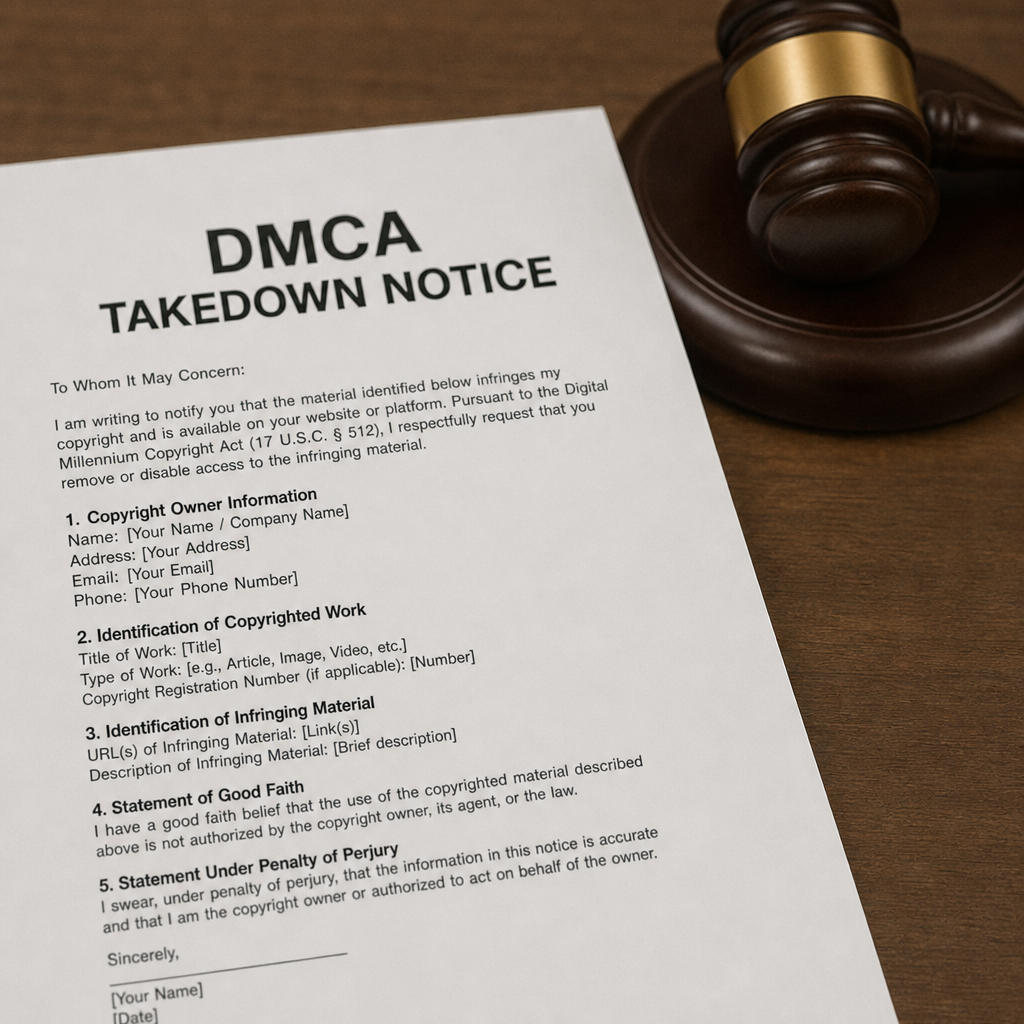
If you use an image without permission, you might receive a DMCA takedown notice for unauthorized image use. The Digital Millennium Copyright Act (DMCA) provides a mechanism for copyright holders to protect their work online.
If a creator finds their image on your site, they can send a formal takedown request to your web host or internet service provider. Your host will likely remove the image or take your entire web page offline until the dispute is resolved. Ignoring a DMCA notice can result in the termination of your hosting account and further legal action.
Sourcing Safe Imagery
Fortunately, there are plenty of legal alternatives to copyrighted imagery that won’t break your budget. You don’t have to steal images to make your content look great.
- Free Stock Photo Sites: Websites like Unsplash, Pexels, and Pixabay offer millions of high-quality images under bespoke free-use licenses.
- Premium Stock Libraries: Subscriptions to Canva, Adobe Stock, or Shutterstock provide legal, royalty-free images with clear usage rights and legal guarantees.
- Create Your Own: The safest way to ensure you own the copyright is to take the photos yourself or create custom graphics using design software.
- Hire a Professional: If you need specific visual assets for your brand, hiring a freelance photographer or illustrator ensures you get unique content with clear, negotiated licensing terms.
Final Thoughts
Navigating image ownership does not have to be intimidating. By assuming all images are protected, searching for watermarks and metadata, utilizing reverse image searches, and understanding different licensing types, you can confidently source visual content. If you are still unsure how to know if an image is copyrighted—or how to check if a picture is copyrighted—ask for permission or use reputable licensed sources. Remember, respecting copyright is not just about avoiding legal trouble—it is about supporting the creators who work hard to produce the beautiful images that enhance our digital world. When you play by the rules, everybody wins.
Frequently Asked Questions
Question: If an image doesn’t have a watermark, is it free to use?
Short answer: No. Assume every image is copyrighted unless you can prove otherwise. Watermarks are just an obvious sign of ownership; their absence doesn’t mean the image is in the public domain or free to use. Using unlicensed images can lead to takedown notices, fees, or legal action.
Question: How can I find who owns a photo I want to use?
Short answer: Start with visual clues (names, logos, © symbols), then check the file’s metadata, and finally run a reverse image search. On Windows, right-click the file > Properties > Details to look for “Copyright” or “Author.” On Mac, open in Preview > Tools > Show Inspector > EXIF/IPTC tabs. Use Google Lens, TinEye, or Bing Visual Search to trace the image back to a photographer’s portfolio or a stock site. If it leads to a premium library (e.g., Getty, Shutterstock) or a pro’s site, it’s copyrighted—purchase a license or request permission.
Question: Do Google Images “Usage rights” filters make images safe to use?
Short answer: They help you find images labeled for reuse (e.g., Creative Commons), but you must still read and follow the specific license. Many CC images require attribution, may forbid commercial use (NonCommercial), or disallow edits (NoDerivatives). Always click through to the source page and confirm the exact terms before using.
Question: Can I rely on Fair Use to use images on my blog?
Short answer: It’s risky and often inappropriate for typical blog or commercial use. Fair Use (in the U.S.) is a legal defense judged case by case, weighing factors like purpose, amount used, and market impact. Unless you’re clearly engaging in activities like critique, commentary, news reporting, teaching, or research—and your use fits the four factors—don’t depend on Fair Use. Seek permission or use properly licensed images instead.
Question: Are social media photos free to use for my business?
Short answer: No. Publicly visible posts on Instagram, Facebook, or X are not public domain; the creator retains copyright. You need explicit permission to download and republish those images. Using the platform’s native embed tool is generally acceptable, but reuploading the file to your own server without permission is a violation.